

Learn how to reduce data usage on Android. As in this modern and tech era, smartphones have loads of advanced mobile applications that lead to increased data consumption on Android devices, resulting in high mobile data bills and diminished battery life.
So, it’s very important to manage data usage on Android devices.By following some simple steps, you can reduce mobile data usage on Android. Here you will get the best ways to save data on Android phones.
How to reduce data usage?
Enable Data Saver Mode on Android
Data saver mode is the first and most convenient data-saving feature to limit data usage. Every Android device running Android 7.0 or later has this data-saving feature, which helps to lower the data usage.
How to turn on Data Saver mode?
To turn on Data saver mode on your Android phone-
First, go to the Settings.
Search for Data saver mode.
Turn on the Data saver mode.
Also read: How to Automate your Android phones to make your phone smarter
Use WiFi whenever Possible
The easiest way to reduce mobile data without compromising the use of the Internet is to use WiFi whenever possible.
When you’re at home, work, or school, you have the option of a secure WiFi network. Always try to keep your wifi enabled so that it gets connected to the available network automatically.
But be careful when you are trying to connect to other public Wi-Fi hotspots; it may not be safe and secure for your device. If you know who is providing the hotspot, then only consider to connect.
Monitor and Set limits for Data usage
Android itself provides a tool to keep an eye on how much mobile data you are using, and you also have the option to limit it as per your need.
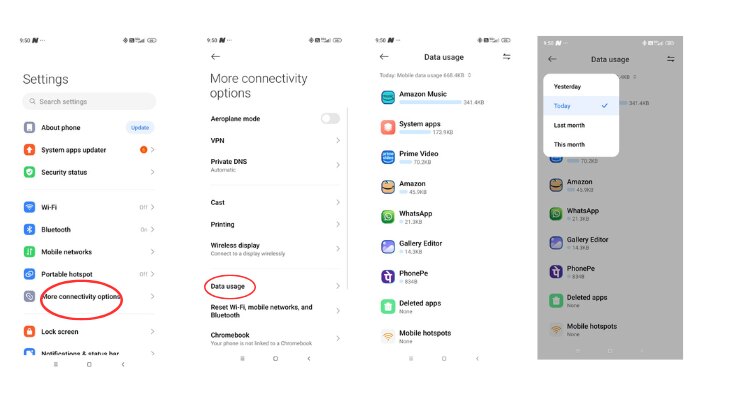
*How to monitor data usage on your Android phone?
Go to Settings and tap on the Connectivity option.
Select Data usage.
There you can easily see how much data you have used. There is an option by which you can check the data usage for the whole month along with which app is using how much data.
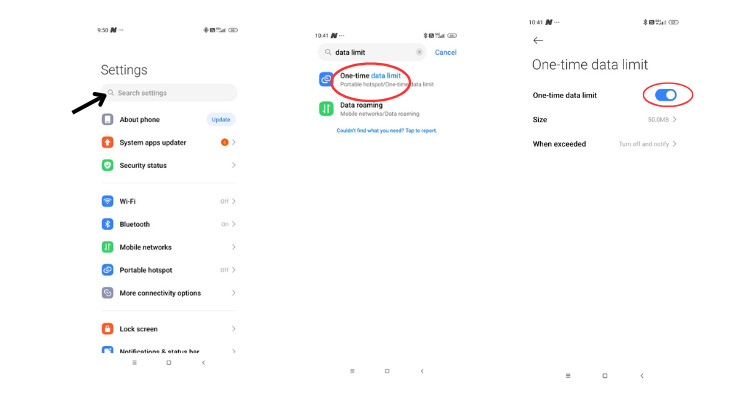
*How to set limits for data usage?
Go to Settings and search for Data Limit.
Select the Data limit and tap the one-time data limit.
There will be an option of choosing the size; you can choose that as per your requirement.
By doing so you can limit data usage on Android apps.
Turn off Background Data for Apps:
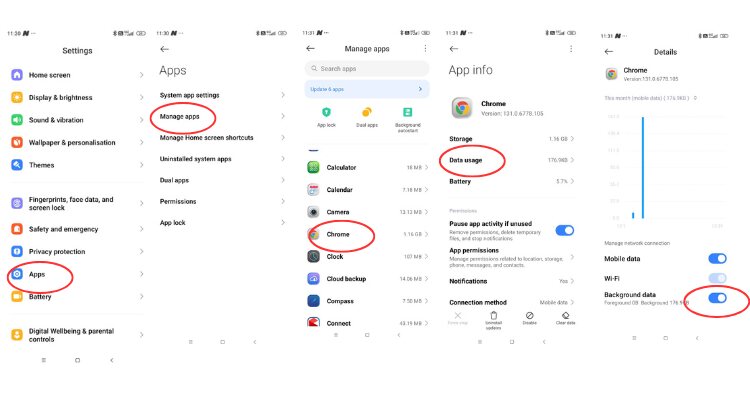
Turning off the background data for apps is also one of the Android data-saving tips.
To turn off the background data,
Go to Settings
Search for apps and tap it
In apps, go to Manage apps.
Choose any app you want to turn off background data.
Then toggle off background data.
Hence, these are some effective ways by which you can limit your data usage on Android. So, those who are looking for answer of how to reduce data usage on Android, they can follow these simple steps.
