
Close Menu
Technology Navigator
    Facebook X (Twitter) RSS
    Technology Navigator
    • Home
    • How to
    • Android
      • Android News
      • Android Phones
      • Android Tablets
    • Tech News
    • Apps
    Facebook X (Twitter) RSS
    Trending
    • Xiaomi budget smartphone Redmi A5 4G launched in India
    • Google System Updates April 2025 for Android
    • Amazon Nova Reel 1.1: An AI video generator model
    • Amazon Project Kuiper launch date is confirmed: Read in detail
    • Instagram DMs get new features: Read here what’s new
    • Project Waterworth: World’s longest undersea cable project by Meta
    • Grok 3 AI chatbot is claimed to be the “Smartest AI on Earth”
    • Vivo V50 price in India is revealed: Check here for specs and more
    Technology Navigator
    Home » Android News » WhatsApp custom lists feature is introduced to filter chats: Read here in detail
    Android News

    WhatsApp custom lists feature is introduced to filter chats: Read here in detail

    Divya SharmaBy Divya SharmaNovember 2, 2024No Comments2 Mins Read
    Share
    WhatsApp Facebook Twitter Email Copy Link

    WhatsApp custom lists feature has been introduced for users so that they can filter chats on WhatsApp with customized lists and will be able to find messages faster.
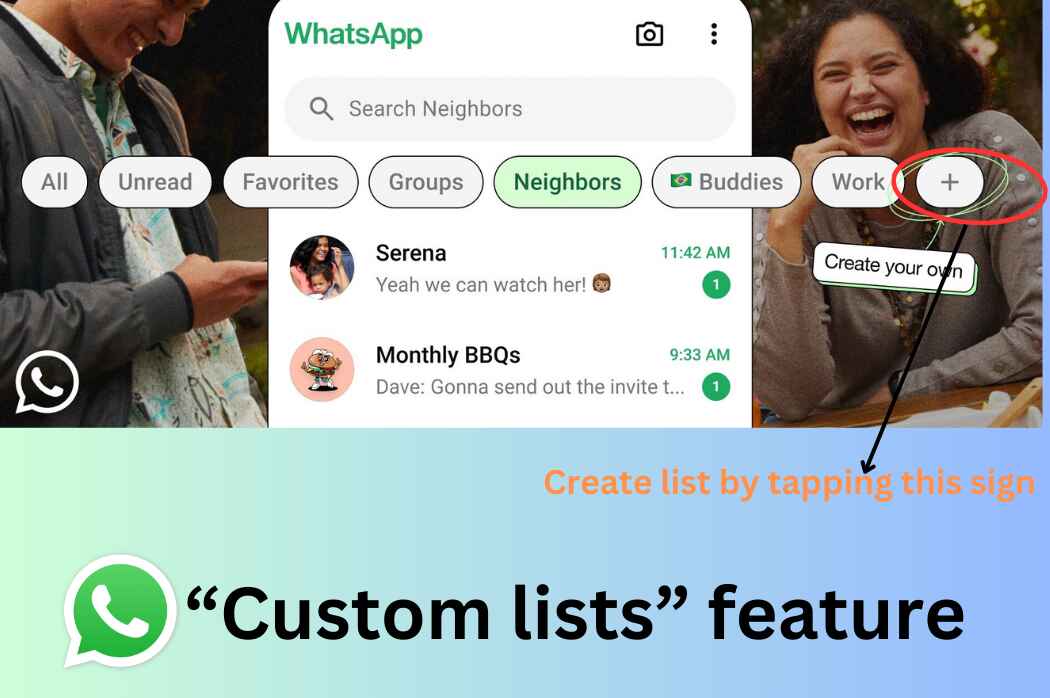
    Whatsapp custom lists feature

    What is custom lists feature of WhatsApp?

    ‘Custom lists’ feature provides an ability to filter chats into customizable categories. With the help of this, you can easily organize your Whatsapp messages by creating list of your own and can have a list for anything including family, work, your neighborhood, and so on.

     It is basically an enhancement to the chat filters that was introduced by Google back in April. Earlier, users were having access of only three filters- ‘All’, ‘Unread’, ‘Groups’. With the new update, now users are able to create list of their own which means “custom lists”, and can focus on their favorite chat easily.

    ‘Custom lists’ feature was discovered earlier in WhatsApp’s beta app for Android, having version number 2.24.18.16

    How ‘custom lists’ can be created?

    Users can create ‘custom lists’ very easily on WhatsApp. Below the steps are mentioned to create ‘custom lists’ on WhatsApp.

    • First, you need to tap the plus sign (+) present in the filter bar at the top of the Chats tab to create a list.
    • Then, you can give the list any name as you desire.
    • After creating list, you can add anyone you want to the list which includes both groups and one-on-one chats.
    • If more lists are added, you can navigate through the filters by swiping on the screen.
    • Also, a list can be edited by pressing it long and choosing to add or remove people or groups from there.

    Well, by default, “All” category that displays all messages in chronological order will still open on WhatsApp. ‘Custom lists’ feature has started rolling out but still few weeks will be taken by it to get available to every WhatsApp users out there.

    For more such latest updates, follow Technology Navigator, your daily dose of technology.

    android
    Share. WhatsApp Facebook Twitter Tumblr Email
    Divya Sharma

    Divya is an enthusiastic Tech writer who has been writing about Android and Tech news, apps, gadgets and web since 2017. She simplify complex tech concepts to provide practical insights to users of all level so they make the most out of their Android devices.

    Related Posts

    Xiaomi budget smartphone Redmi A5 4G launched in India

    April 16, 2025

    Google System Updates April 2025 for Android

    April 10, 2025

    Vivo V50 price in India is revealed: Check here for specs and more

    February 17, 2025
    Leave A Reply Cancel Reply

    CAPTCHA Image
    Refresh Image

    *

    Latest Posts

    Xiaomi budget smartphone Redmi A5 4G launched in India

    April 16, 2025

    Google System Updates April 2025 for Android

    April 10, 2025

    Amazon Nova Reel 1.1: An AI video generator model

    April 9, 2025

    Amazon Project Kuiper launch date is confirmed: Read in detail

    April 4, 2025

    Instagram DMs get new features: Read here what’s new

    February 20, 2025
    Facebook X (Twitter) RSS
    • Home
    • About
    • Contact
    • Privacy Policy
    • Correction Policy
    • Disclaimer
    • Terms & Conditions
    © 2026 - Technology Navigator

    Type above and press Enter to search. Press Esc to cancel.